
Download WriteMapper – Free Mind‑Map Writing Tool for Windows
WriteMapper is a free Windows application that blends the visual power of mind‑mapping with the discipline of structured outlines. Built for business professionals, students, and anyone who writes regularly, WriteMapper turns scattered ideas into clean, hierarchical drafts without the usual writer’s block. By letting you brainstorm on a canvas, rearrange nodes instantly, and export the final document in multiple formats, the app creates a seamless bridge between creative thinking and polished output. Its intuitive interface, direct‑in‑node editing, and automatic draft generation make it a standout productivity tool for anyone who wants to write faster, clearer, and with less stress.
Core Features that Power Your Writing Workflow
- Visual Mind‑Map Canvas: Drag‑and‑drop nodes, nest ideas, and see the entire structure at a glance.
- In‑Node Text Editing: Write, format, and revise content directly inside each map node, eliminating the need to switch windows.
- Automatic Draft Generation: Convert the nested map into a linear document with proper headings and indentation in seconds.
- Multi‑Format Export: Save your work as .txt, .rtf, .docx, .pdf, or plain markdown for easy sharing.
- Outline‑First Approach: Encourages a logical flow before you dive into paragraphs, reducing revisions later.
- Free & Secure: No hidden fees, no ads, and all data stays on your local machine.
- Search & Replace: Quickly locate terms across the whole map and replace them without losing structure.
- Custom Themes: Choose light or dark themes to match your visual preference and reduce eye strain.
Each of these features works together to create a fluid writing environment. The visual canvas helps you capture fleeting thoughts, while the automatic outline ensures those thoughts are organized logically. Export options mean you can move from brainstorming to final submission without copying and pasting between apps, preserving formatting and hierarchy. Because WriteMapper is free, you can adopt it across teams without worrying about license costs, and the local‑only storage model keeps proprietary information safe.
Installation & First‑Time Use – Step‑by‑Step
Getting WriteMapper up and running is straightforward. Follow these steps to start turning ideas into outlines today:
- Download the Installer: Visit the official WriteMapper website and click the “Download for Windows” button. The file size is under 30 MB, so it downloads quickly even on slower connections.
- Run the Setup: Double‑click the .exe file. Windows will prompt you to confirm the installation; click “Yes” to allow the installer to make changes.
- Accept the License: The wizard presents a short end‑user license agreement. Read it, then click “I Agree” to continue.
- Choose Installation Folder: By default, WriteMapper installs to
C:\Program Files\WriteMapper. You can change this path if you prefer a custom location. - Complete Installation: Click “Install” and wait a few moments while the program copies files and creates shortcuts.
- Launch the Application: Once installation finishes, click “Finish” to open WriteMapper automatically or use the desktop shortcut.
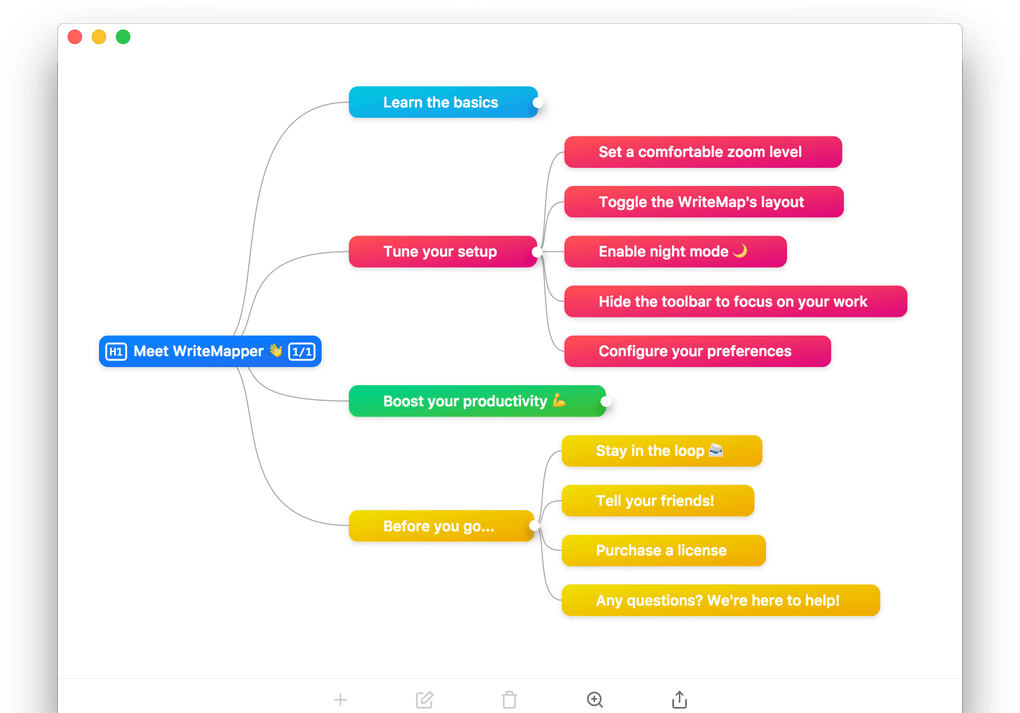
When you first open WriteMapper, a welcome screen offers a brief tutorial that walks you through creating your first mind map. Click “New Map,” type a central topic, and press Enter to add child nodes. Use the toolbar icons to add siblings, create sub‑branches, or delete nodes.
To edit text, simply click a node and start typing; formatting options appear at the top of the window. When your map reflects the desired structure, select “Export → Draft” and choose the format that fits your workflow. The generated document mirrors the map’s hierarchy, giving you a ready‑to‑publish outline in seconds.
System Compatibility, Pros & Cons
WriteMapper is designed exclusively for Windows 10 and later, supporting both 64‑bit and 32‑bit architectures. The application runs smoothly on typical office hardware (Intel i3/i5, 4 GB RAM minimum) and does not require an internet connection after installation, making it suitable for secure environments or offline workstations.
Pros
- Free to use with no hidden charges.
- Intuitive visual interface that reduces the learning curve.
- Instant draft generation saves time on formatting.
- Multiple export options cater to diverse publishing needs.
- Local‑only storage protects confidential information.
- Lightweight installer (under 30 MB) and fast performance.
Cons
- Only available on Windows; no native macOS, Linux, Android, or iOS versions.
- Feature set is focused on outline creation; lacks advanced collaboration tools.
- No cloud sync; users must manually transfer files between devices.
- Limited theme customization compared to some premium mind‑mapping apps.
FAQ – Everything You Need to Know About WriteMapper
Is WriteMapper really free?
Yes. WriteMapper is completely free for personal and commercial use. There are no hidden fees, subscriptions, or in‑app purchases.
Can I import existing documents into WriteMapper?
WriteMapper focuses on creating outlines from scratch. While it cannot directly import full‑text documents, you can copy and paste sections into nodes to reorganize them visually.
What export formats are supported?
The software exports to .txt, .rtf, .docx, .pdf, and markdown (.md). Each format preserves the hierarchical structure generated from the mind map.
Does WriteMapper work on tablets or touch‑screen PCs?
Yes, the interface responds to touch input, but the experience is optimized for mouse and keyboard use on traditional PCs.
How secure is my data?
All data is stored locally on your computer; WriteMapper does not upload files to any server. This ensures that confidential notes stay under your control.
Final Verdict – Should You Download WriteMapper?
WriteMapper delivers a focused, no‑cost solution for anyone who struggles to turn raw ideas into coherent outlines. Its visual mind‑map canvas makes brainstorming enjoyable, while the one‑click draft generation eliminates the tedious step of manually converting notes into a structured document. Although it’s limited to Windows and lacks collaborative cloud features, those constraints are offset by its speed, privacy‑first design, and range of export options. If you spend a lot of time drafting reports, articles, or project plans and want a tool that keeps you organized without a subscription fee, WriteMapper is a smart addition to your productivity toolkit.
WriteMapper excels at turning chaotic thoughts into clean outlines. Its free price tag and offline‑first approach make it ideal for privacy‑sensitive environments. The only drawback is the lack of macOS or mobile versions, but for Windows‑based writers the app is a genuine time‑saver.







